The student registration module upgraded from 8.7 to 9.0. With this upgrade, the student registration is more intuitive and easier to use. |
Some key features:
Additional supportive materials and videos are below. |

|
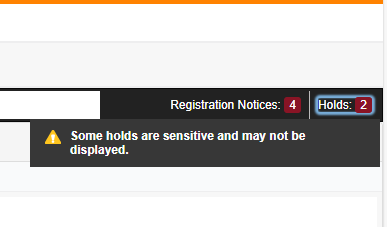
BANNER 9 REGISTRATION Known Issues in Student Holds & RegistrationThe Student Advising Profile sometimes displays the message “Some holds are sensitive and may not be displayed.” These “sensitive holds” come from financial processes like payment plans or direct deposit and do not block registration. They appear only because they occupy the same system space where registration holds are stored. If you’ve cleared the advising hold and no other actual hold is listed (for example, an Accounting Hold), you can ignore the message and let the student know they are free to register.
|
|
|
ACADEMIC ADVISORS Remove Academic Advising Hold: Video OR PDF
|
STUDENTS Financial Agreement Acceptance at Registration: Video OR PDF Update or Confirm Contact Information at Registration: Video OR PDF |
Featured Videos (Part 1):
|
Featured Videos (Part 2):
|